AI · Health · Mobile

Novu.
A calmer way to ask,
"am I okay?"

An AI health companion that bridges the gap between shrinking access to care and the simple need for reassurance — built around symptom assessment, mental health support, and trust by design.

ResearchPrototypeUsability TestingHeuristic EvalHi-Fi UI
Novu screen
Novu screen
Novu screen
Novu screen
Novu screen

"I just need someone to tell me I'm going to be okay."

Novu is an AI health insight tool designed for people losing quick access to medical care. It blends symptom assessment with mental health support — conversational, accessible, and held together by transparent privacy controls.

Type
AI Health Companion · Mobile App
Team
3 Designers
Names
Ameenah Khan, Dante Johnson, Isabella Alisuretov
Timeline
Quarter Project

01 · Problem Statement

Access to quick, reliable medical guidance is shrinking.

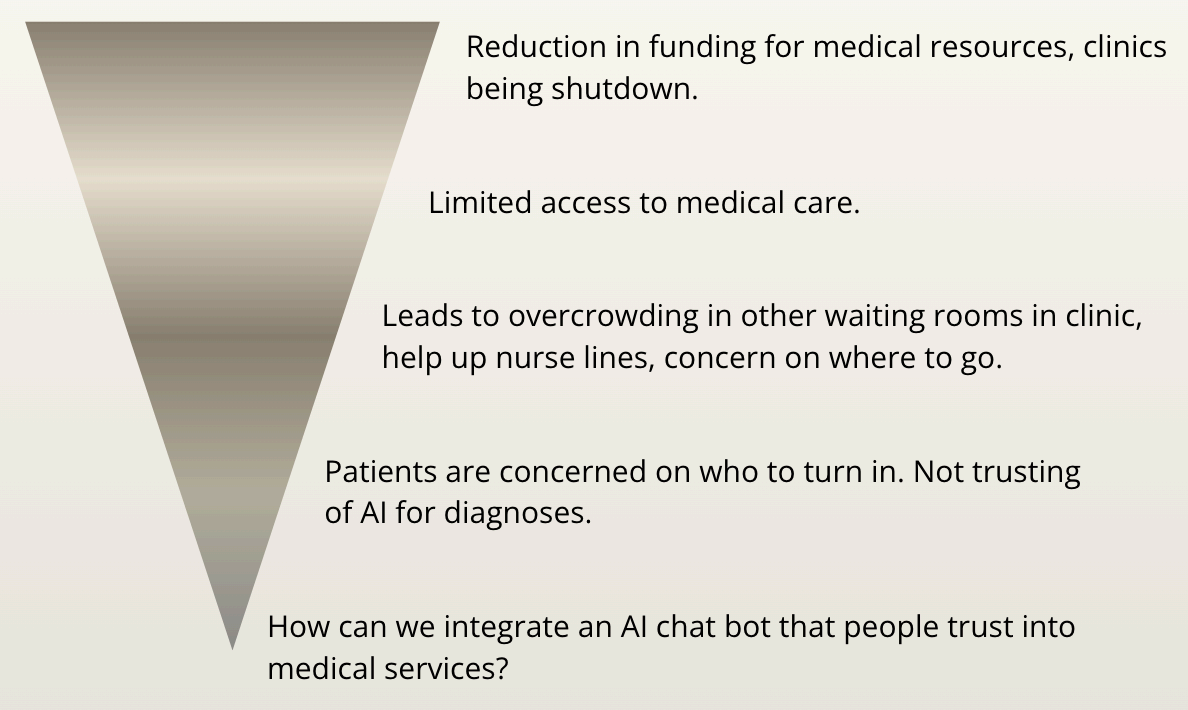
Access to quick, reliable medical guidance is shrinking (Figure 1.1). Funding cuts lead to staffing shortages and clinic closures, which lead to long wait times at other clinics. These factors have created a widening gap between patients who need timely health reassurance and the systems that once provided it. People who relied on walk-in clinics or same-day appointments are now left waiting, or turning to unreliable sources online, when a health concern arises.

The people that are most affected are those who live in healthcare deserts or underserved communities, patients without consistent healthcare insurance or providers, and anyone who just needs a quick answer without wanting to wait long. This also includes younger, tech-savvy users who are already inclined to seek support digitally, as well as people dealing with health anxiety who simply need some reassurance or someone to talk to at the moment.

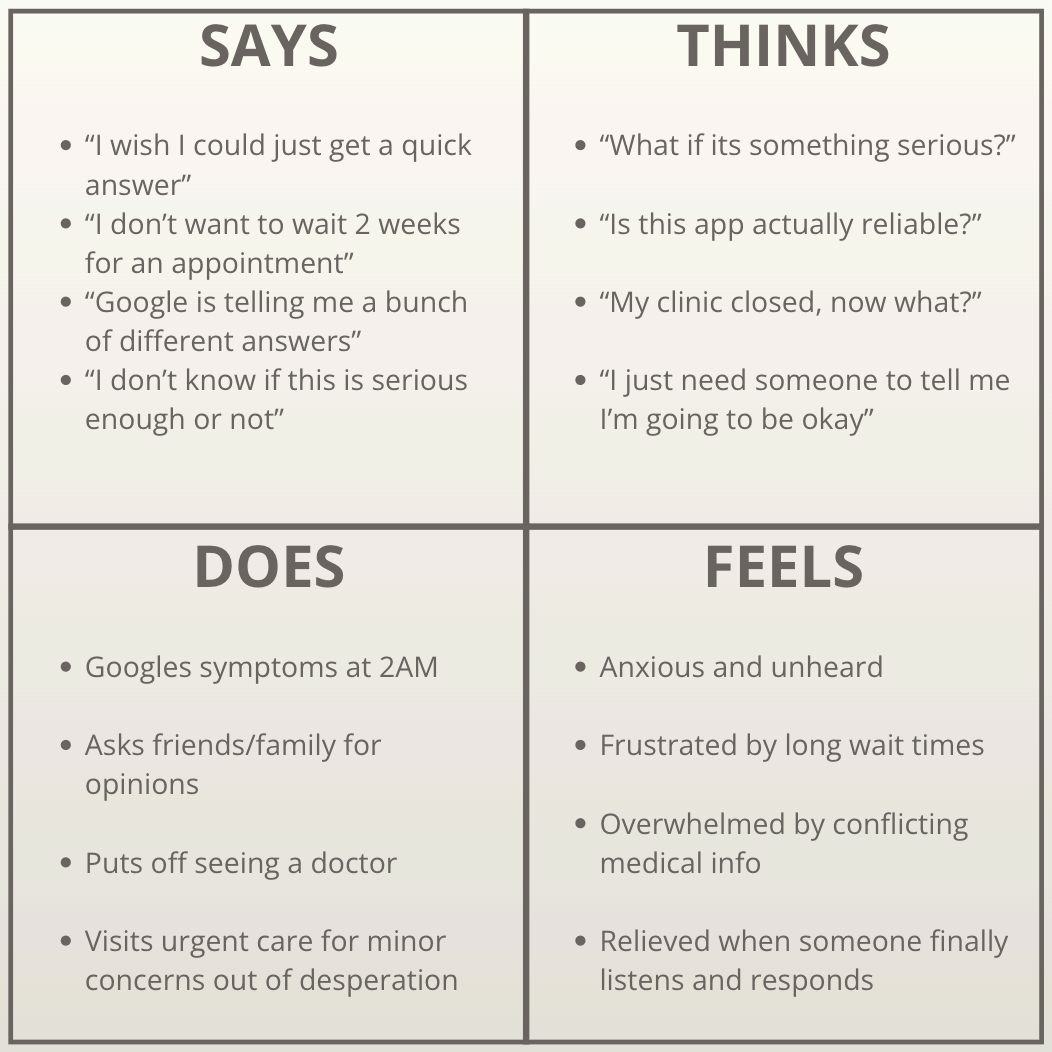
With these shutdowns and slow-downs happening, patients need trustful insight. They are left in a gap between needing reassurance and not having a quick place to turn to (Figure 1.2). Lack of attention towards current health problems or potential health problems can lead to greater consequences. When reassurance isn't accessible, small worries can spiral and real symptoms can go unaddressed.

We interviewed potential users to ground our understanding of the problem. Participants rarely consult a doctor for medical concerns, yet had already turned to AI for physical health questions. When asked about using a trusted, ethical AI health tool, both said they would, but were somewhat iffy on the mental health aspect. They were concerned about AI's overconfidence, feeling that at some point the AI should guide them toward a real therapist. Privacy was also a consistent concern, with users wanting explicit accountability from the app if their data was ever compromised. These interviews confirmed that the demand for a tool like NOVU is real, but there is strong trust and privacy that should come alongside it.

Existing solutions don't really help bridge that gap. Search engines return information without context or care, and the closest competitors such as other health insight tools each solve parts of the problem but consistently miss the same thing; emotional attunement. They're built to inform or diagnose—which is great—but only that and not to comfort. A person's physical health and mental well-being is the core to how they navigate through their life, so we want to help and provide a resource where it will help them in doing that.

Design Question

How might patients who are losing quick access to medical services effectively trust and use an AI insight tool to help ease their concerns and get quick answers / possible solutions to health anxieties they might be having?

Problem funnel diagram
Figure 1.1 · Narrowing down the problem
Empathy map
Figure 1.2 · Empathy map

02 · Evaluation

Listening before designing.

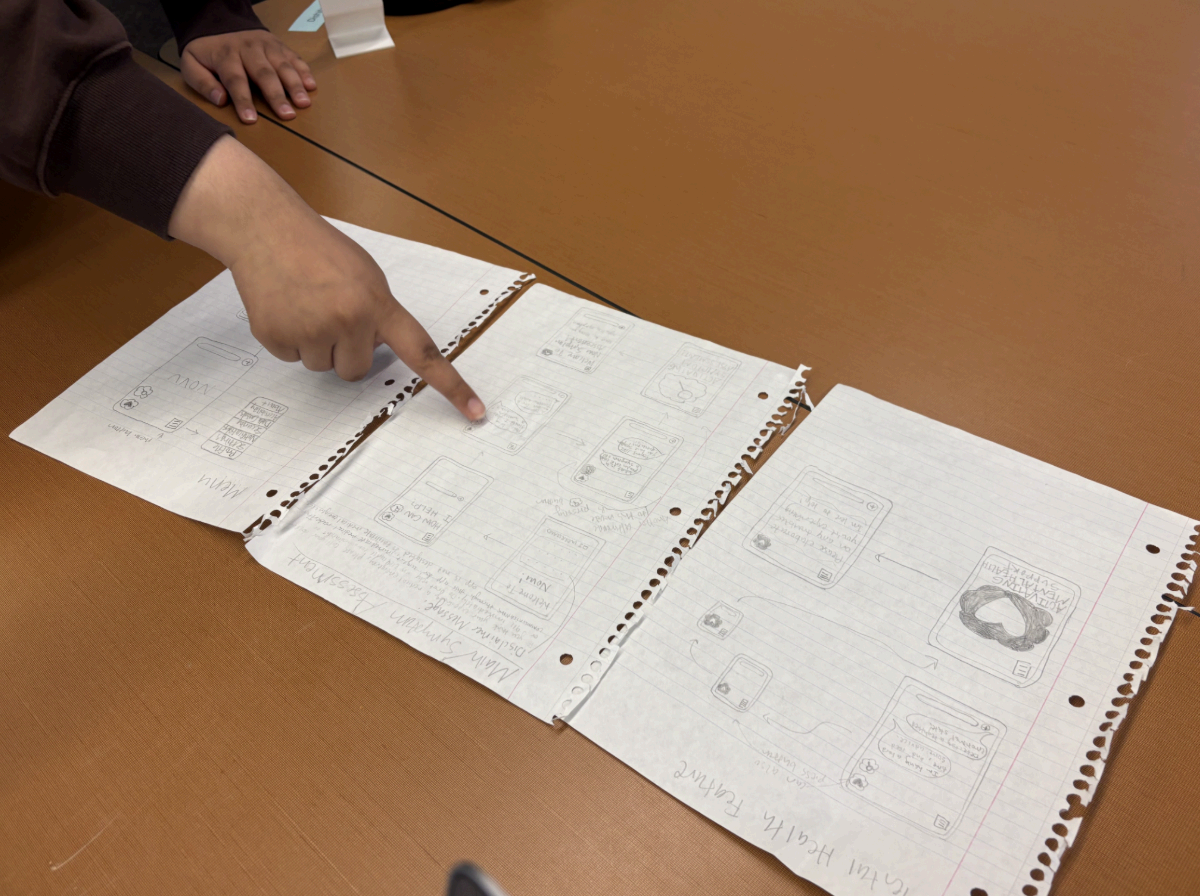
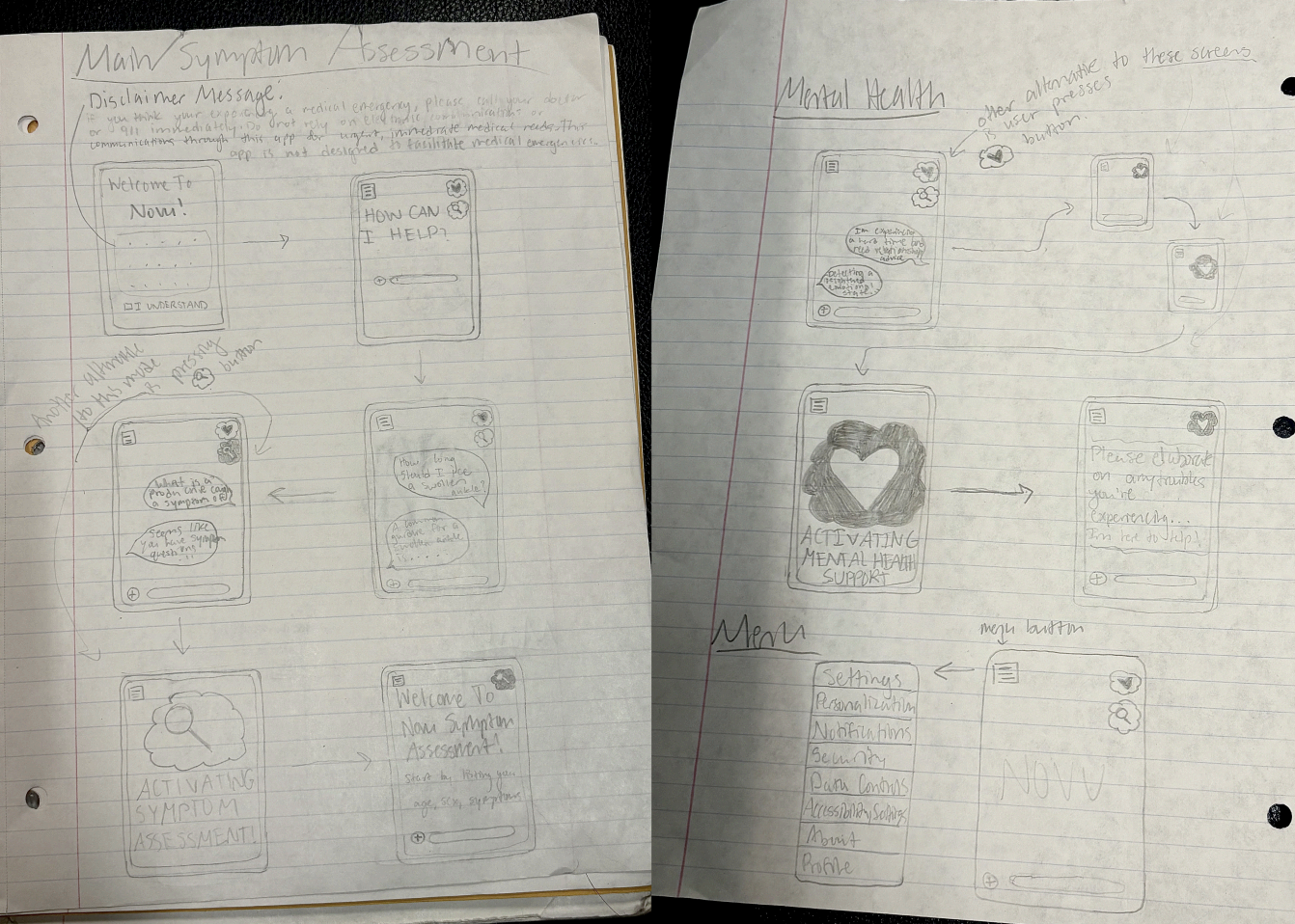
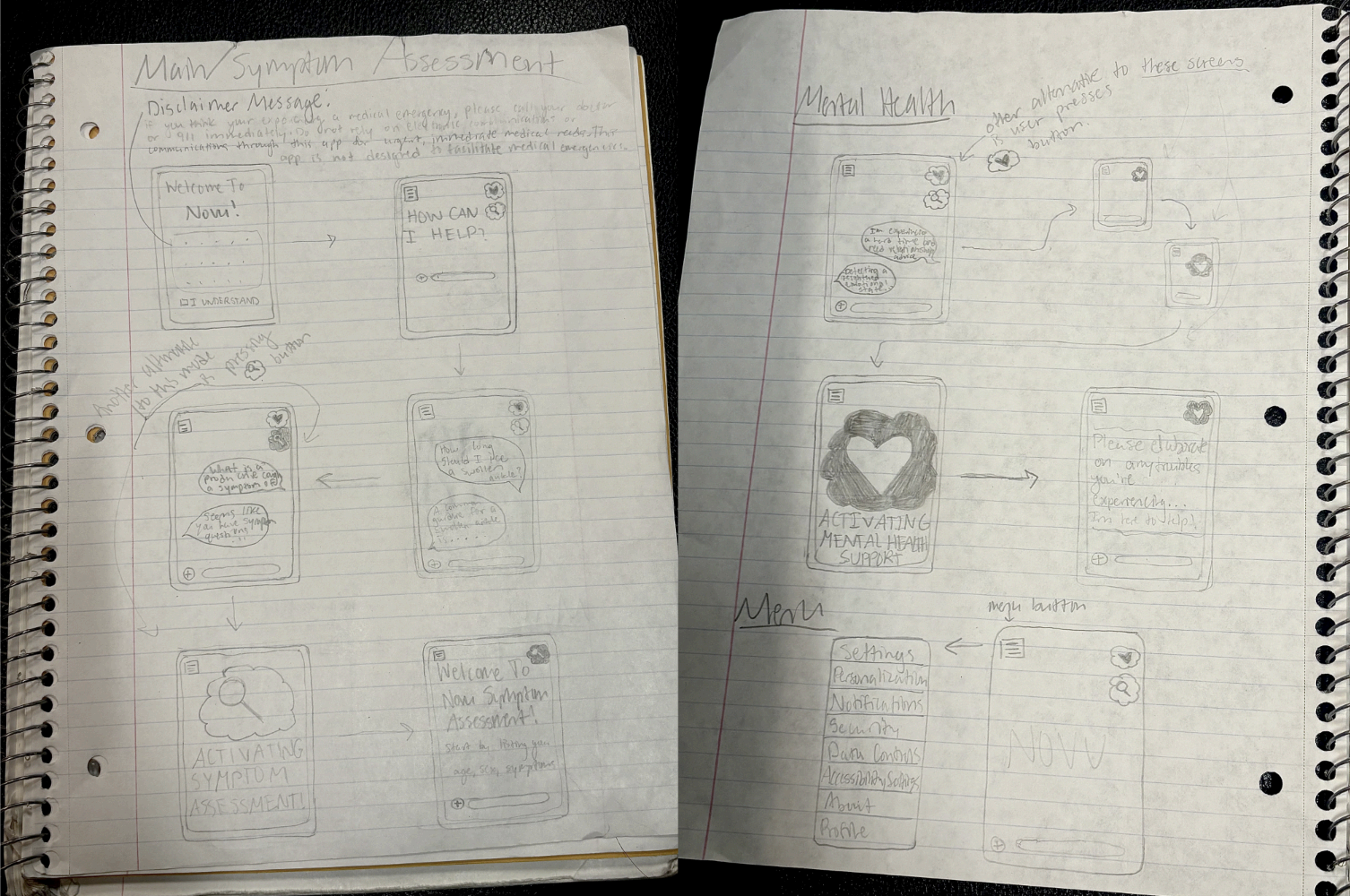
To evaluate our design, we conducted two rounds of usability testing with two different groups of students (Figure 2.1). Each session asked users to perform a set of tasks from our low-fidelity prototypes (Figure 2.2), including navigating the main menu, accessing the symptom based assessment mode and the mental health mode, and other additional features like the add file/image buttons and finding their way back to the menu from a conversation. The goal was to observe how naturally users moved through the app, identify points of confusion, and understand how they felt about interacting with an AI in a health context.

Usability testing
Figure 2.1 · Leading usability tests
Low-fi sketches
Figure 2.2 · Low-fidelity prototypes

2.1 User Tests

Both rounds of testing confirmed that the interface was simple and easy to navigate. Users in the first session were able to access the different modes without much friction and understood the general purpose of the app quickly. By the second session, users were navigating the application and switching between modes intuitively, which suggested that the core layout was clear and learnable.

User Test 1: These group members navigated switching between different modes and explored the features of our interface. The application is designed to give either physical health advice or mental health advice. This group gave suggestions for interface and user experience improvements, and asked questions on how the chatbot would respond to irrelevant questions (e.g. if it wasn't related to health in any way). It was something we hadn't thought about, so that was something we considered when thinking about how to prompt our AI. They also helped us discover the need for a back button.

User Test 2: These group members were asked to navigate the main menu and additional buttons, and share their thoughts on the app's features and which mode they would be more inclined to trust and use. Their feedback surfaced two key feature recommendations: a memory function that allows NOVU to reference past conversations to provide more contextual responses, with the option to clear that memory for privacy, and a voice chat feature for both the user and the chatbot to make interactions feel more natural, particularly within the mental health mode.

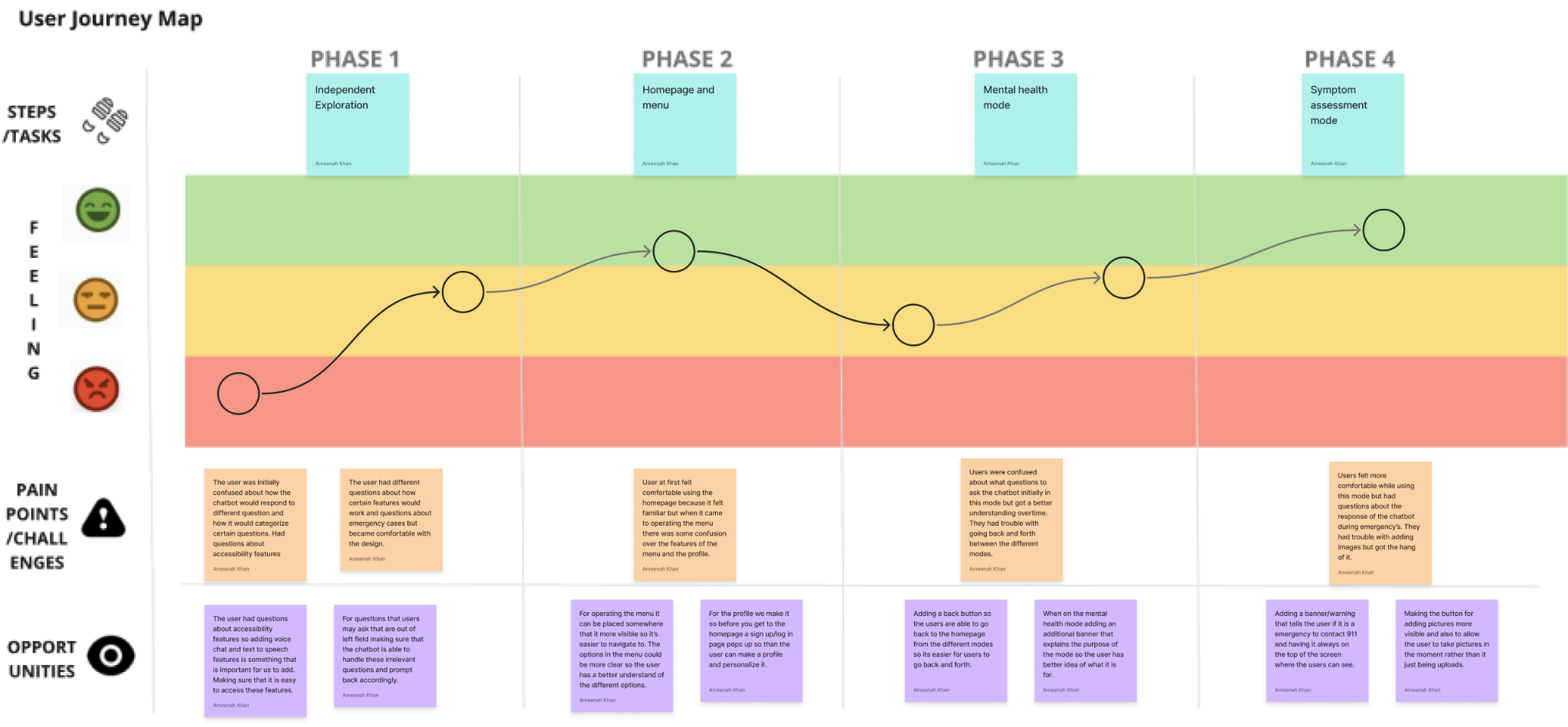
Overall, we learned that users were more comfortable receiving symptom-based guidance for physical health concerns. This distinction directly shaped how we approached each mode's tone and design. Users also raised concerns about data privacy and how their profile information would be used to personalize responses, signaling that trust and transparency need to be built into the experience, not just assumed. We also learned that if the chatbot identifies a potential medical emergency, users expect a clear recommendation to contact emergency services, which we incorporated as a design requirement. Across both rounds of testing, the clearest takeaway was that our core design decisions were sound. Users found the interface intuitive and were able to navigate it without significant guidance. Where the testing proved most valuable was in surfacing gaps we hadn't anticipated: how the chatbot should handle off-topic inputs, the need for basic navigation controls like a back button, and the importance of giving users control over their data through features like memory clearing. (Figure 2.3)

User journey map
Figure 2.3 · User journey map

2.2 Heuristic Evaluation

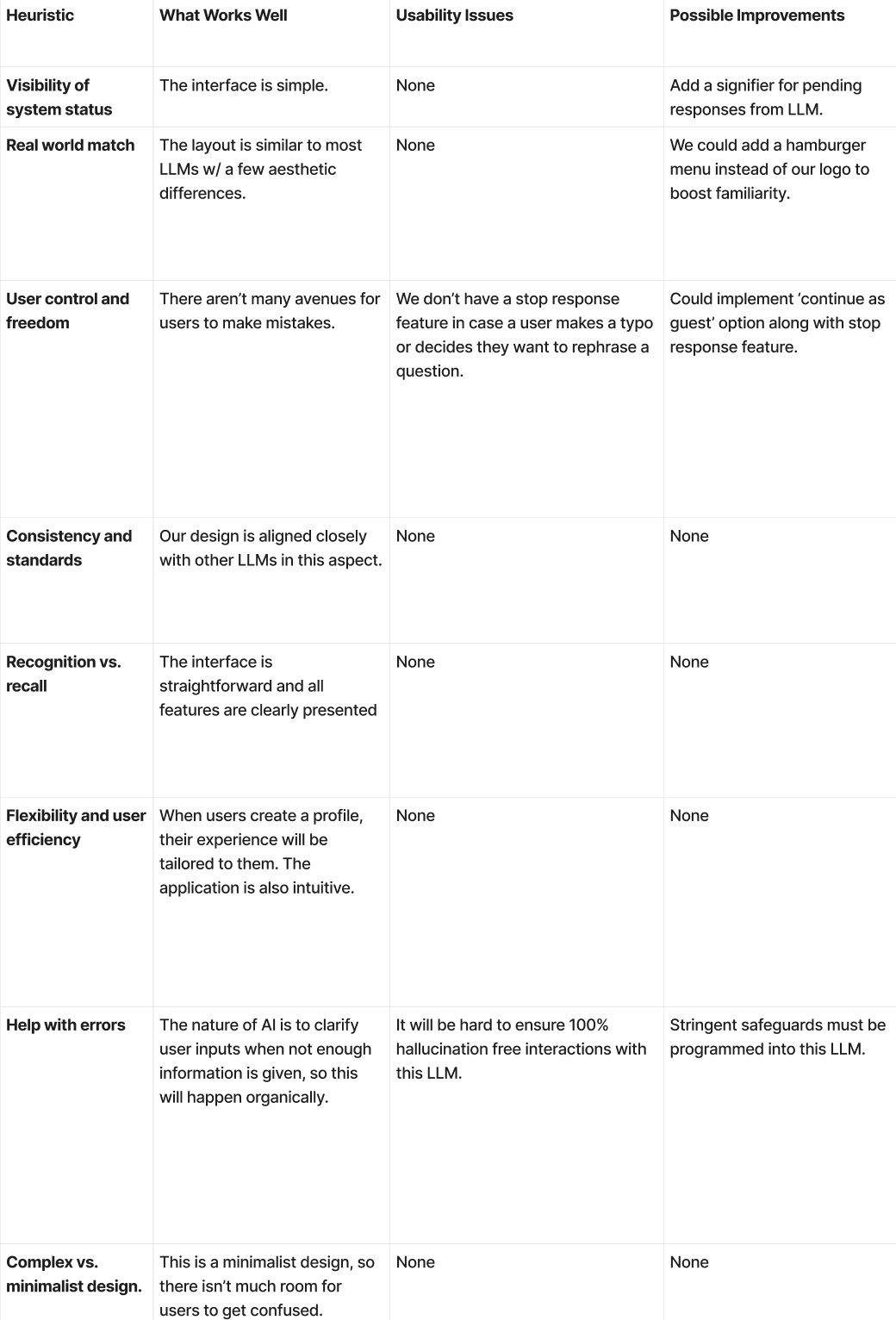
In addition to usability testing, we conducted a heuristic evaluation of the interface using Nielsen's 10 usability heuristics (Figure 2.4). Overall, the design held up well. The minimalist layout reduced cognitive load, features were clearly surfaced without requiring users to recall them, and the profile-based personalization supported flexibility and efficiency. The most notable gap identified was around user control and freedom: without a stop-response feature, users who made a typo or wanted to rephrase a question had no way to interrupt the AI mid-response. We also flagged that hallucination risk in a health context requires stringent safeguards, since the consequences of inaccurate information are higher stakes than in a general-purpose chatbot. These findings informed our next iteration priorities.

Heuristic evaluation table
Figure 2.4 · Heuristic evaluation

03 · Design Rationale

Why a conversational companion.

Through our user research, we found that potential users would benefit from a tool that is easily accessible for their medical concerns and questions. This led us to develop a medical AI chatbot that users can turn to for medical questions, advice, symptom assessment, and mental health support.

When developing our design, we considered other options, such as focusing solely on symptom assessment, helping people find nearby medical clinics and book appointments, and answering medical questions. While these options are all helpful in different ways, each has its downsides. While conducting the market competitive analysis, we found other AI symptom assessment bots, such as Ada, that tended to be less conversational, flexible, and personalized. It showed us that while symptom assessment is useful, there is so much more that can be done for the user and the user experience. When looking into designing something to help people find clinics and book appointments, we realized many existing websites already did that, so there wasn't much need for it. We realized we could add that as a feature to Novu. When designing a medical AI chatbot focused solely on answering medical questions, we reviewed existing chatbots such as ChatMed. We found that, while it was more conversational, it was more focused on providing answers than being helpful. After going through all the different design ideas, we realized we could create something that accomplished many of the same goals as the others, but at a much higher level. Novu's design can provide medical advice, conduct symptom assessments, and assist with mental health issues while remaining conversational and trustworthy. This design can cover more bases than any of the other design ideas we had.

Through user research, we heard from potential users that they were worried most about privacy and data leaks. During usability testing, one of the groups also shared concerns about data privacy. During both user research and usability testing on privacy, we prioritized adding a privacy agreement and medical disclaimers. In the profile setting, there is also an option to clear the memory and to adjust the memory settings. During usability testing, one of the groups shared accessibility concerns, so we added accessibility features such as voice-to-text, speak selection, and the ability for users to make changes through the accessibility settings during profile creation.

During the design process, our group was focused on personalization, privacy, safety, and accessibility. We realized that adding certain design features could introduce privacy risks. Adding profile creation as an option means the user needs to provide more personal information, and, in turn, the responses are more tailored to the user, making for an overall better experience. By adding the add photo option, we need to ask users for permission to access their cameras or photos, which introduces additional privacy concerns. The more features we added to create a better user experience, the more we were also asking from the user. This is something we had to consider every time we added a feature, which is why we gave the user the decision: do they want to use this feature? Do they need access to it? Are they okay with that? At the end of the day as designers we want to create the best experience for all users.
04 · Design Solution

One companion. Two modes. Built around trust.

The core concept of our design is to provide users with quick, accessible medical information/advice, as well as mental health support. It allows users to ask medical questions, get a symptom assessment, and ask for mental health support. Instead of users waiting in urgent care for hours on end or searching the internet for answers, they can look to NOVU for non-emergent situations.

Figure 4.1 · Low Fidelity Prototype

Our low-fidelity prototype showcases our initial idea for the chatbot. This design was more focused on broader features, such as the symptom assessment mode and the mental health support mode. The prototype explores possible disclaimer messages, feature placement, and how everything could flow together. While the final design solution includes more features and has evolved from here, this was the initial vision that shaped it. Once that foundation was built, we were able to envision how users would interact with the system.

Figure 4.2 · User Flow Diagram

We can see in Figure 4.2 that, once the user enters the system, the first thing they see is the emergency medical disclaimer. Once the user clicks "I understand," they are given the option to create a profile or to continue to the main page. If they decide to create a profile, they add their information and then continue to the main menu; otherwise, they just go straight to the main menu. The user can then prompt the medical chatbot, which responds to the prompts. The prompt can be put into two categories: symptom assessment or mental health, but it may not fit either. If it isn't put into a category, the user continues the conversation until they are satisfied, then goes back to the main menu. But if it is placed in one of the two categories, it uses that category's specific interface. It continues the conversation with the AI bot by prompting the user with a question to understand the situation better. The user continues the conversation in both cases, but in the mental health support mode, the AI bot provides mental health advice to the user. In the symptom assessment mode, the user receives an assessment of their symptoms. Once both interfaces reach those points, the user presses the back button, returning to the main screen and reaching the end. That is how the user interacts with the system.

User flow diagram
Figure 4.2 · User flow diagram

4.1 Key features of the design

This section talks about key features of the design and the reasoning behind them.

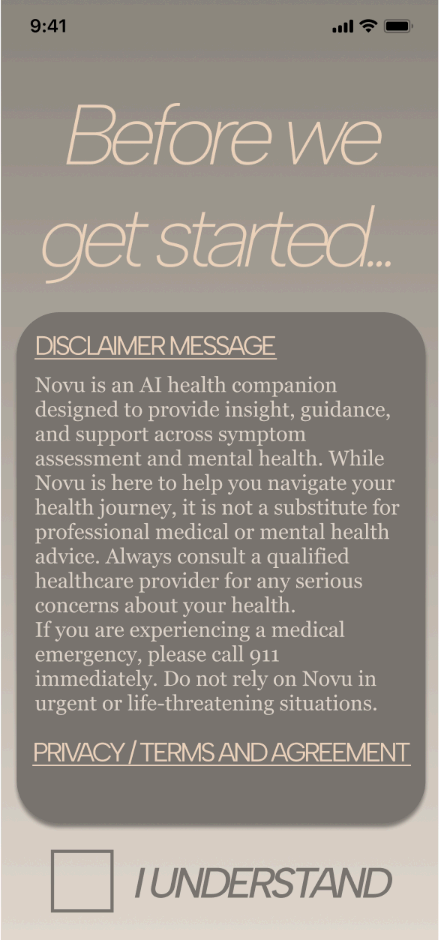
Emergency Disclaimer / Privacy Agreement

Figure 4.3a

Emergency Disclaimer / Privacy Agreement

Key feature: The disclaimer message and privacy agreement screen. This feature explains to the user what Novu is and isn't capable of, as well as the privacy agreement. This screen ensures that users understand Novu's limitations and their rights regarding personal data.

Sign up

Figure 4.3b

Sign up

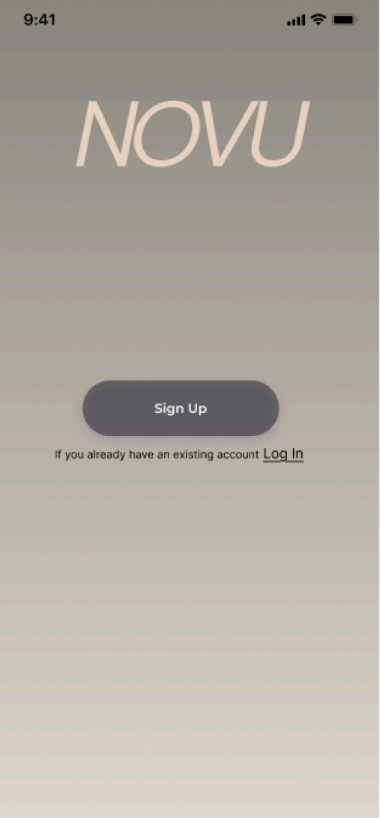
Key feature: This is the sign-up. This feature allows users to sign up or log in to Novu. If the user clicks sign up, they create their own account, where they can add their personal information and personalize it as they please.

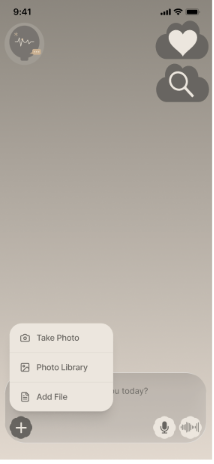
Additional Features

Figure 4.3c

Additional Features

Key feature: This feature showcases additional options available to the user, such as taking photos, adding a photo from the photo library, and adding a file. If the user wants to give Novu a better idea of what their symptom looks like, they can use one of the additional features.

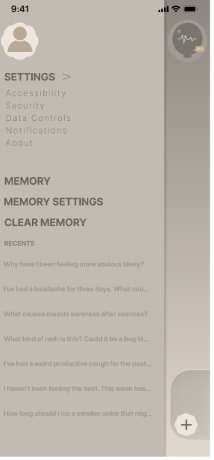
Settings and Memory History

Figure 4.3d

Settings and Memory History

Key feature: This feature allows the user to access the settings menu, where they can view the accessibility, security, data controls, notifications, and about tabs. The user can also see the memory settings, clear the memory, and view recent conversations stored in the memory. This page allows users to personalize Novu to their needs.

Mental Health Support

Figure 4.3e

Mental Health Support

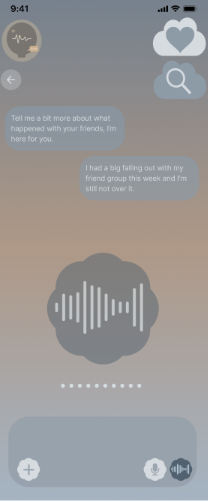
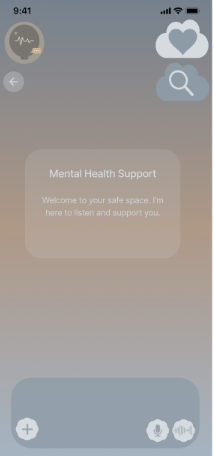
Key feature: Mental Health Support mode is one of the main features of Novu. In the mental health mode, the user can talk to the chatbot about situations they are going through, get advice, vent, and learn about mental health tools.

Symptom Assessment Mode

Figure 4.3f

Symptom Assessment Mode

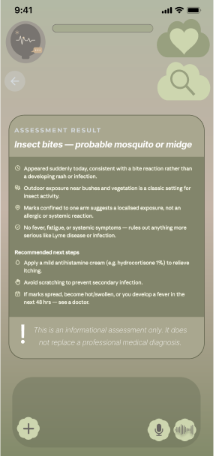
Key feature: Symptom Assessment mode is one of the main features of Novu. The symptom assessment mode prompts users about their symptoms and asks questions based on the user's responses. This continues until the bot can narrow it down and provide the user with an assessment report. The assessment report tells the user what the possible cause is, provides an explanation, recommends next steps, and warns about the limitations of the symptom assessment mode.

Voice-to-Text

Figure 4.3g

Voice-to-Text

Key feature: Voice-to-Text allows users with low visibility, motor impairments, dexterity issues, and learning disabilities to use Novu. It can also be helpful if someone doesn't feel like typing everything out. This feature makes Novu accessible to even more people.

4.2 Addressing the problem

The problem our team chose to address was: how do we get patients who are losing quick access to medical services to trust and use an AI insight tool to ease their concerns and get quick answers/possible solutions to health anxieties they might be having? When looking at the problem and our design, it feels as though we were able to do that successfully. The key thing was making something accessible to people. Our design is available to everyone, and it includes accessibility features such as the Voice-to-Text feature (Figure 4.3g) that make it even more accessible. As well as in the settings menu (Figure 4.3d), where users can make further adjustments to Novu and personalize it to make it easier for them to use. The second reason it addresses the problem is that we took into account all the feedback we received from user research and usability testing. Something we kept hearing was that people were concerned about their privacy and data. When we look at the settings menu (Figure 4.3d), we see that the user has access to the security and data controls tabs, allowing them to make adjustments as they please over time. As well as clearing the memory, so your previous conversations and the personal context the bot learns about you are erased. Adding features like the Symptom Assessment mode (Figure 4.3f) and the Mental Health Support mode (Figure 4.3e) allows users to use it for various reasons, making them more likely to trust Novu to ease their health anxieties. Novu is capable of answering medical questions, providing medical advice, conducting symptom assessments, and offering mental health support. It is available 24/7 and is a place where people who have lost quick access to medical services can go to ask questions about health concerns.

05 · Reflection & Learning

From idea to tangible.

Design thinking starts simply as an idea. It can be a grueling, but rewarding process in taking that idea and turning it into something tangible. This is the concept of prototyping, which enabled us to bridge the gap between concept and reality. The prototyping phase of design thinking was critical for us to gather meaningful feedback from our peers and refine the product we envisioned.

Our primary challenge was deciding how to formulate our medical disclaimer, which forced us to have an in-depth conversation about what exactly Novu could do. As simple as it seems, this is when we determined the core functionality and possible limitations of Novu. Through drafting our disclaimer and conducting some research, we discovered that we needed to dive deeper into AI hallucination risks. Mitigating these risks would require strict safeguards, especially when using Novu's mental health mode, which we ultimately determined would be best supported by keeping a human in the loop.

This was not the same vision we had at the beginning of our design process. Given more time, we would gather more data and feedback through usability testing from a larger population of individuals, do extensive research into preventing AI hallucinations, and incorporate these findings into the finished product.

Overall, we had fun developing Novu and this project taught us how to disregard our own perceived limitations in the ideating phase of the design process. The mind works best when it's open.

06 · Limitations & Future Plan

Tradeoffs and what's next.

Novu is not currently designed to support emergency medical situations, nor is Novu designed to alert emergency medical services.

Novu was designed for users without medical insurance or feasible access to medical care. We never considered how Novu could be beneficial to users who have both.

Our primary tradeoff: While Novu is designed to detect and identify emergency medical situations from user prompts, we chose not to allow Novu to alert emergency medical services directly. We came to this conclusion to prevent unnecessary dispatches of emergency medical services stemming from symptom misinterpretation and AI hallucinations.

Future iterations of this design could integrate data from wearables such as Oura ring, Apple watch, and Fitbit that aggregate vital statistics and can assist in emergency medical detection. Moreover, with user consent, agents like Apple's Siri and Amazon's Alexa could enable Novu to alert emergency medical services directly.

"I just need someone to tell me I'm going to be okay."

The user quote that shaped every decision.